According to recent survey data, over 30,000 small to medium-sized businesses in 2025 rely on Dynamics 365 Business Central for finance, sales, and operations, and nearly 93% of them are already using it to report revenue growth. That installed base is now the launchpad for the biggest shift in SMB ERP in a decade: Copilot in Business Central is turning D365 BC from a passive system of record into an active, conversational operating layer that automates work across the entire process map.
This guide walks through what Copilot in Business Central actually does, which processes it transforms end to end, how the new agent layer (Sales Order Agent, Payables Agent, Copilot Studio) changes the ceiling of what you can automate, and how it ties back into the broader Azure AI stack you may already be running.
What is Copilot in Business Central?
Copilot in Business Central is Microsoft’s AI-powered assistant built directly into Dynamics 365 Business Central, designed to automate routine tasks, surface insights, and let users interact with ERP data using natural language. Since the 2023 Wave 2 release, it has been integrated into Business Central, is available exclusively in Business Central online environments, leverages natural language processing to understand user queries, and includes a growing set of features tailored to different roles and tasks.
Three facts worth stating up front, because they drive almost every ROI question that follows:
- It is included in your BC license. Copilot is currently included with Business Central licenses at no additional cost.
- It is online-only. It works exclusively with Business Central online, it isn’t available for on-premises or private cloud deployments.
- It respects your existing security model. Copilot adheres to Business Central’s existing security model, and access to Copilot features is governed by standard Business Central permission sets.
For a deeper look at how Microsoft’s AI stack layers on top of your data estate, our breakdown of Microsoft Fabric’s features, capabilities, and strategic insights explains the data foundation Copilot ultimately relies on.
Why Copilot-driven automation matters inside D365 BC
Most “AI in ERP” conversations stall at feature tours, autofill, summaries, marketing text. That framing undersells what’s actually happening. Copilot’s real impact in Business Central isn’t that it adds buttons; it’s that it collapses entire multi-step processes into a single prompt, and now, with the agent layer, into a background workflow that runs without a human in the loop.
Three structural shifts are driving the change:
- Natural language replaces navigation. Users describe outcomes; Copilot executes against the right pages, tables, and extensions.
- AI runs inside the flow of work. Copilot lives on the pages your team already uses, vendor records, sales orders, bank reconciliations, not in a separate tool.
- Agents move from assistive to autonomous. Business Central now ships Sales Order Agent and Payables Agent overviews, meaning entire transactional loops can run with human-in-the-loop oversight instead of human-in-the-loop execution.
The Copilot in Business Central feature set, mapped to the processes it automates
Rather than another feature list, here is what each capability actually replaces in an SMB operating model.
Finance and Record-to-Report
Microsoft Copilot in Business Central automates reconciliation, accelerates reporting, and unlocks real-time financial insights. In practice:
- Bank account reconciliation: Copilot matches imported bank statement lines to ledger entries by comparing descriptions, amounts, dates, and patterns, cutting the volume of unmatched transactions that need manual review.
- Analysis assist: Finance users ask questions of ledger and sub-ledger data in natural language and get grouped, filtered results back without building a view from scratch.
- Narrative drafting: Period commentary, variance notes, and executive summaries are drafted from the underlying numbers instead of written cold.
For teams that need to push these finance signals outward to downstream reporting, our automated data reporting practice connects BC’s Copilot outputs to the dashboards your leadership team actually opens.
Sales and Quote-to-Cash
Sales users spend disproportionate time keying order lines, searching the catalog, and reconciling emailed POs. Copilot in Business Central compresses that work:
- Sales line suggestions: Copilot proposes line items based on historical patterns, substitutes, and current availability.
- Marketing text generation: Product descriptions for new SKUs are drafted from attributes, which is especially useful for teams rolling out online storefronts.
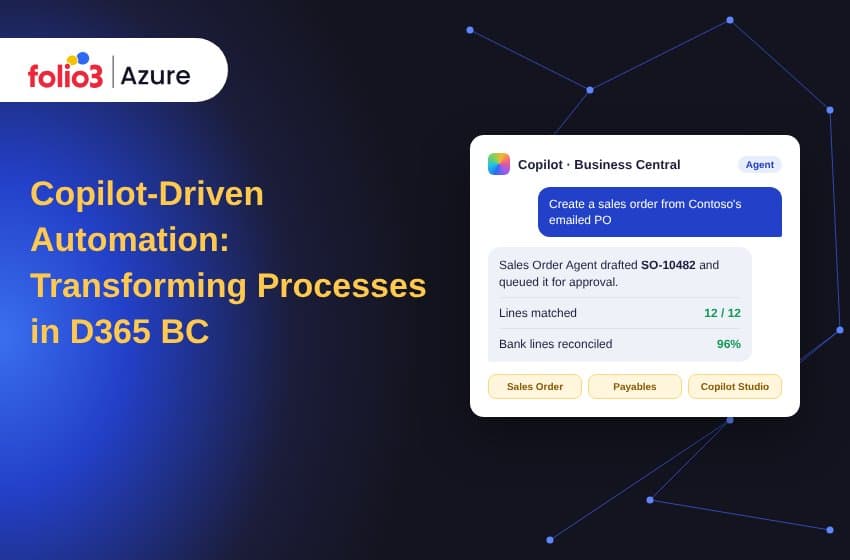
- Sales Order Agent: The Sales Order Agent is an AI-powered tool that runs in the background and utilizes AI to help make decisions faster and easier. It can read inbound customer order emails, resolve customer and item records, draft a sales order inside BC, and queue it for a human to approve.
Procurement and Procure-to-Pay
This is where the agent layer bites hardest. The Payables Agent handles vendor invoice intake, matching, and posting preparation. Autofill with Copilot speeds routine data entry, and chat with Copilot lets purchasers ask questions like “what did we pay this vendor last quarter?” without building a report.
Supply chain and inventory
Demand forecasting, late-order detection, and item substitution suggestions all surface inside the same Copilot interface rather than as separate add-ons.
Cross-process: autofill, summarize, and chat
Three horizontal features touch every module:
- Autofill with Copilot: automatically fills fields without extra searching; pulls information from online and from data within your system to make suggestions, and consolidates all suggestions in one panel.
- Summarize with Copilot: a Summary box appears on document pages so you can learn the most important details quickly.
- Chat with Copilot: natural-language questions against your BC data, with answers grounded in records you have permission to see.
The agent era: where Copilot in Business Central is heading
Most content in this space still describes Copilot v1. The real 2026 story is the agent layer.
Microsoft is publishing guidance for Business Central partners on how agents are designed, built, governed, and deployed, demonstrating practical AI automation scenarios, and positioning Business Central as a platform for improving productivity and business processes with AI. The underlying mechanics that make this work are new:
- MCP Server for Business Central: A new MCP Server for Business Central lets partners create custom agents in Microsoft Copilot Studio that connect directly to Business Central and access advanced capabilities. This is the integration surface that turns BC into an addressable backend for any Copilot Studio agent.
- Copilot Studio for BC: low-code agent builder that reads from and writes to Business Central through governed connectors. For a hands-on walkthrough, our team’s deep-dive on creating a custom agent in Microsoft Copilot Studio for Business Central covers the end-to-end build.
- Industry agents: ready-to-deploy agents for finance, HR, supply chain, and sustainability. Folio3’s Copilot Agent Library catalogs pre-built scenarios so teams don’t start from a blank Copilot Studio canvas.
The bottom line: Copilot in Business Central is no longer only an in-app assistant. It is the user-facing surface of an agent fabric that extends across BC, Microsoft 365, and the broader Azure stack.
Where Copilot in Business Central meets Azure AI
The feature that most SMB-focused posts leave out is the Azure layer underneath. Copilot in BC is powered by Azure OpenAI Service, which means two important things:
- Your data is not used to train the underlying model. Business data is not used to train the underlying language model, and all Copilot interactions respect existing role-based access and security settings within Dynamics 365.
- You can extend Copilot with the same Azure services you already govern. Azure AI Search, Azure Functions, Logic Apps, and Microsoft Fabric all plug into Copilot Studio agents built against BC. If Fabric is new to your data team, the features, benefits and use cases of Microsoft Fabric explain how OneLake and Fabric’s AI capabilities fit alongside Business Central’s Copilot. For enterprises standing up Fabric as the analytics backbone for ERP-driven AI, our Microsoft Fabric services covers assessment through deployment.
This Azure-layer story is the differentiator most Dynamics-partner blogs miss, and it’s where process automation inside BC meets the broader AI roadmap your IT leadership is already building.
Business impact: what Copilot in BC actually moves
The value of Microsoft Copilot in Dynamics 365 Business Central is not confined to a single department; it ripples across every function, compounding into tangible gains for the entire organization. In addition to automation, Copilot adds precision and consistency, providing finance teams more confidence in their numbers and more time for strategic analysis. By simplifying processes such as order fulfillment and content creation, Copilot enables you to bring products to market faster and respond to shifting demands with greater agility.
The practical outcomes we see across Folio3 implementations:
- Finance: faster monthly close, fewer unmatched bank lines, higher confidence in reported numbers.
- Sales: shorter quote-to-order cycles, fewer rekey errors, higher sales rep throughput.
- Procurement: automated invoice intake, cleaner three-way matching, fewer late payments.
- IT / Admin: smaller training burden for new BC users and fewer tickets for “how do I find X in BC?”
If you want to see pattern examples across industries before scoping your own build, Folio3’s library of ready-to-deploy Microsoft Copilot services is organized by business function so you can start from a known pattern.
Getting started with Copilot in Business Central
A short, honest sequence that avoids the “turn it on and see” trap most teams fall into.
- Confirm you are on BC online. On-premises and private cloud don’t qualify.
- Open the Copilot & agent capabilities page. Press Alt + Q, search for “Copilot & agent capabilities,” and review which features are Generally Available vs. Preview in your region.
- Check Azure region vs. OpenAI endpoint. If your BC environment is in a region whose Azure OpenAI endpoint sits elsewhere, you’ll be prompted to allow data movement across geographies.
- Grant permissions deliberately. Copilot access is governed by standard BC permission sets; grant per role, not per user.
- Decide where agents fit. Start with one process: Sales Order Agent for inbound email orders is a common first use case, before building custom agents in Copilot Studio.
- Plan the Azure extension layer. If you expect to extend Copilot (custom skills, grounding on your docs, cross-system actions), pre-scope the Azure OpenAI Service, Azure AI Search, and connector work.
For enterprises moving from “Copilot is on” to “Copilot runs these processes,” Folio3’s catalog of pre-built AI agents on Azure shortcuts the Copilot Studio build phase.
Where Folio3 fits
Folio3 is a Microsoft Solutions Partner working across the Azure AI, Power Platform, and Dynamics 365 Business Central stack. For teams planning Copilot-driven automation inside D365 BC, our work usually covers three layers:
- BC + Copilot activation: enabling the right Copilot features for your role mix, aligned with permissions, data residency, and preview-vs-GA risk.
- Agent builds on Copilot Studio: custom agents against Business Central using the MCP Server for BC, grounded in your docs and connected to Azure OpenAI.
- Azure AI + data layer: Fabric for the analytical surface, Azure OpenAI for custom models, and governed pipelines so agents act on fresh, trustworthy data.
Book a 30-minute discovery call with an Azure engineer and we’ll walk through which processes in your BC environment are the shortest path to Copilot-driven ROI.
Common questions about Copilot in Business Central (FAQ)
Is Copilot in Business Central free?
Currently, Copilot in Business Central is included with your Business Central licence at no extra cost. Extended scenarios that build on Azure OpenAI Service (custom agents, grounding on your own documents) consume separate Azure resources.
Does Copilot in Business Central work on-premises?
No. Copilot is exclusive to Business Central online.
Is my data used to train the AI models?
No. Business data is not used to train the underlying language model, and all Copilot interactions respect existing role-based access and security settings within Dynamics 365.
Can Copilot in BC see my Microsoft 365 data?
Currently, there’s no direct connection between Copilot in Business Central and Microsoft 365 Copilot. Copilot features inside Business Central are unaware of your Microsoft 365 data. Microsoft 365 Copilot, in the other direction, can read Business Central data.
What are Business Central agents?
Business Central ships agents including the Sales Order Agent and Payables Agent, which run in the background to automate transactional work. Custom agents can be built in Copilot Studio against Business Central through the MCP Server for BC.
Can partners extend Copilot?
Partners can extend Copilot using Business Central’s development platform by registering new capabilities through the AI module.