Most mid-market CFOs still get their close reports 10 days after period-end, and by the time the board sees them, the number has already moved. Microsoft now has over 55,000 small and midsize businesses running Dynamics 365 Business Central as of April 2026 (announced by Bryan Goode at Directions NA 2026), and the finance teams inside those businesses are discovering that Copilot in Business Central changes the close-to-report cycle from days to minutes.
This guide walks finance leaders through exactly how Copilot delivers real-time financial reporting inside D365 BC, what it does natively, where you need Copilot Studio to extend it, how multi-entity consolidation works, and what governance you need in place before you let AI draft audit-visible commentary.
What is Copilot financial reporting in Business Central?
Copilot financial reporting in Business Central is Microsoft’s embedded AI capability for drafting financial statements, running analysis-assist queries over GL data, generating variance commentary, and summarizing cash flow, all in natural language, inside the Business Central interface, using real-time ERP data. It is included with your Business Central license, works only on Business Central online, and respects your existing BC permission sets.
Three facts BOFU readers always ask up front:
- It’s native, not an add-on. Copilot ships inside Business Central online. No separate SKU to buy for the core capabilities.
- It reads real-time GL data. When you ask Copilot a question, it queries live Business Central tables, not a stale extract.
- It respects permissions. A controller sees only what their permission set allows. Copilot cannot exfiltrate what the user cannot see.
For context on the data foundation these AI capabilities ultimately pull from, our overview of Microsoft Fabric’s features, capabilities, and strategic insights explains how Fabric and OneLake fit alongside BC’s native reporting.
Copilot in Business Central vs. Copilot for Finance
A disambiguation that trips up almost every finance evaluator, because the names overlap:
| Dimension | Copilot in Business Central | Copilot for Finance |
|---|---|---|
| Where it lives | Inside BC pages | Inside Microsoft 365 (Outlook, Teams, Excel) |
| Who it’s for | BC users doing in-ERP work (controller, AP/AR, accounting) | Finance users working outside BC who need BC data (collections, exec reporting) |
| Example task | “Draft the P&L for Q3 and explain variances” | “Pull this customer’s aging and unpaid invoices into my reply from Outlook” |
| Licensing | Included with BC license | Microsoft 365 Copilot add-on |
| Integration | Native | Native integration between BC and Copilot for Finance for real-time AR data in Outlook |
Short rule for your team: Use Copilot in Business Central for building financial statements, analysis-assist queries, and variance commentary inside the ERP. Use Copilot for Finance when your finance team is working from Outlook or Excel and needs live BC data on hand.
The real-time financial reporting workflow with Copilot in BC
Rather than another feature list, here is the end-to-end close-to-report cycle, Copilot step by step.
1. Clean ingest and reconciliation
Copilot matches imported bank statement lines to ledger entries by comparing descriptions, amounts, dates, and patterns, cutting the volume of unmatched transactions that need manual review. For teams drowning in bank-reconciliation grunt work, this alone recovers 2–5 days of controller time per month.
2. Ledger-to-report analysis assist
Analysis assist lets finance users query the general ledger in natural language and get grouped, filtered, pivoted answers without building a report from scratch. Instead of “I need an ad-hoc view of SG&A by cost center with YoY variance for Q3,” the controller just asks for it in the Role Center and Copilot returns the view.
3. Financial statement drafting
Business Central’s no-code financial reporting lets you build financial statements (P&L, balance sheet, cash flow) tailored to how your business actually looks, and Copilot drafts and edits them on request. Period-end statements that used to be a half-day Excel assembly become a prompt-and-review workflow.
4. Variance commentary
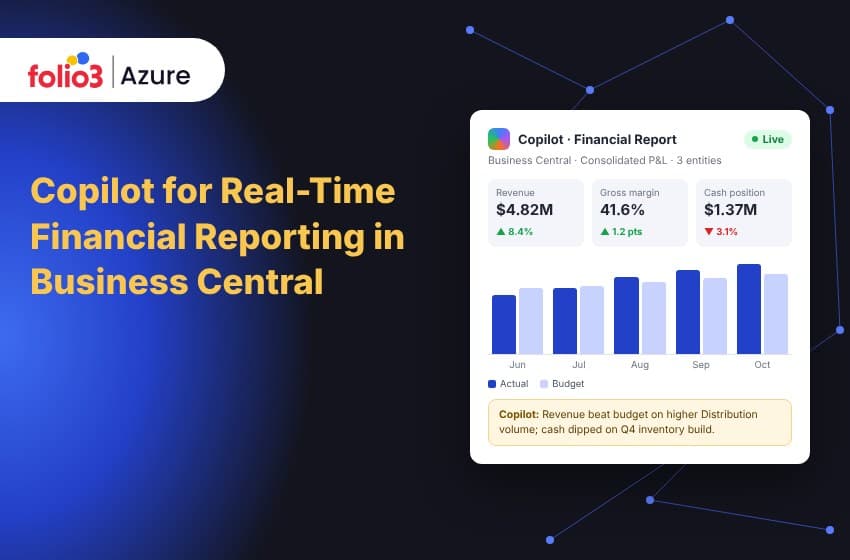
This is where real-time matters most. Instead of a controller manually writing commentary comparing actual vs. budget vs. prior period, Copilot generates clear, natural-language explanations of financial variances, then the controller edits for tone and nuance. Monthly commentary that took 4 hours now takes 30 minutes.
5. Executive summarization
Copilot’s summarize capability produces one-paragraph summaries of a document, dashboard, or ledger slice useful for the “I need the executive version in 15 minutes” board request. This pairs with Copilot in Power BI, which gives you a conversational AI assistant that can produce an executive summary on your financial overview using natural language. Our Power BI services team sets this up end to end on top of BC data.
6. Distribution via dashboards and mobile
Reports are available within the BC platform and on the Business Central mobile application so the CFO sees the same real-time view on a phone that the controller sees on a desktop. For teams that need to push these finance signals further out into Teams channels, scheduled email digests, or executive portals our automated data reporting practice handles the distribution layer.
Beyond native: when you need Copilot Studio for custom finance agents
Native Copilot in BC covers 70–80% of standard finance-reporting work. The remaining 20–30% is where mid-market finance teams usually have custom logic: custom GL dimensions, specific allocation rules, bespoke KPIs, and that’s where Copilot Studio and the MCP Server for Business Central come in.
A new MCP Server for Business Central lets partners create custom agents in Microsoft Copilot Studio that connect directly to Business Central and access advanced capabilities. For finance teams, this means you can build:
- Custom “controller agents” that know your chart of accounts, your dimension structure, and your reporting cadence
- Scheduled finance agents that run at 7am every morning, draft the daily cash position, and post it to Teams
- Audit-trail agents that log every Copilot interaction with a GL record for your external auditors
- Multi-entity consolidation agents that pull from several BC environments and produce a group P&L
For a hands-on walkthrough of building one, our team’s deep-dive on creating a custom agent in Microsoft Copilot Studio for Business Central covers the end-to-end build. If you want to shortcut the Copilot Studio build phase with pre-built scenarios, Folio3’s catalog of AI agents on Azure ships finance-specific starting points.
Multi-entity, multi-currency, real-time consolidation
This is where most Dynamics-partner content stops short, and it’s where mid-market CFOs with 3+ entities feel the most pain.
Organizations operating globally can consolidate financial statements across different currencies, ensuring consistency and accuracy in their reporting, and when Copilot sits on top of that consolidated layer, executives gain a consolidated, real-time view of business performance across entities, empowering confident decision-making at scale.
The architecture Folio3 typically deploys:
- BC entities per legal entity (one BC environment per subsidiary, or multiple companies in a single tenant depending on scale)
- Microsoft Fabric as the consolidation surface, OneLake pulls from each BC entity’s data, applies elimination entries, and produces a unified group view. If Fabric is new ground for your team, the features, benefits and use cases of Microsoft Fabric explains why it has become the default analytical layer under BC.
- Copilot in Power BI on top of Fabric for conversational executive queries
- A custom consolidation agent in Copilot Studio for scheduled group reporting and FX revaluation summaries
Our Microsoft Fabric services covers the assessment-to-deployment path for teams moving from entity-level Power BI reports to a true real-time group reporting layer.
Governance and audit-defensibility, the CFO question nobody else is answering
If Copilot drafts your variance commentary, is the output audit-defensible? Short answer: yes, if you set it up correctly. Four controls Folio3 configures as standard:
- Scoped permission sets: Copilot can only read what the invoking user is permitted to see; enforced at the Business Central permission layer, not a Copilot-level setting that can be bypassed.
- Logged interactions: every Copilot query against GL data is logged for audit.
- Human-in-the-loop by default: all AI-generated commentary and reports require a human reviewer sign-off before anything is posted, published, or distributed externally.
- Model data residency: if your BC environment is in a region whose Azure OpenAI endpoint sits elsewhere, Business Central prompts you to allow data movement across geographies, and the admin controls whether that movement is permitted. For regulated industries, this is configurable and auditable.
The guiding principle: Copilot drafts, humans sign. Your audit trail is unchanged in terms of accountability; your controller is still the one who approves the number. Copilot has just saved them 4 hours of drafting.
Measurable ROI, what to expect
The ranges we see across Folio3 Copilot + BC deployments in finance teams:
| Metric | Typical improvement |
|---|---|
| Days to close | 3–7 days faster |
| Bank reconciliation effort | 60–80% less manual review time |
| Variance commentary drafting | 4 hours → 30 minutes |
| Executive report preparation | Half-day → 20 minutes |
| Cash position visibility | Weekly → real-time |
Folio3’s library of ready-to-deploy Microsoft Copilot services is organized by business function, the finance block ships with pre-built reporting agents, variance explainers, and close-tracker patterns.
Industry cuts
Three industries where this story bites hardest:
- Manufacturing: Copilot drafts standard-vs-actual cost variance commentary across work orders, flags unusual overhead absorption, and summarizes WIP valuation changes.
- Distribution / Wholesale: real-time margin by SKU, channel, and warehouse; Copilot flags inventory write-downs before they distort the P&L.
- Professional services: project profitability by engagement, utilization by consultant, WIP-to-billings variance, all queryable in natural language against BC’s project accounting.
Getting started with Copilot financial reporting in BC
A short, honest sequence:
- Confirm BC online. Copilot in BC is exclusive to Business Central online, on-premises and private cloud don’t qualify.
- Enable the Copilot & agent capabilities page. Press Alt + Q, search for “Copilot & agent capabilities,” and review which finance features are Generally Available vs. Preview in your region.
- Clean up your chart of accounts. Copilot drafts commentary from your data as-is. If your dimensions are messy, your AI commentary will be too.
- Grant finance permissions deliberately. Scope by role: controller, FP&A analyst, CFO, not blanket access.
- Pilot one process. Variance commentary or bank reconciliation are the two highest-ROI starting points.
- Plan the Azure extension layer. If you’ll build custom agents (chart-of-accounts-aware controller agents, consolidation agents), pre-scope the Azure OpenAI Service, Copilot Studio, and MCP Server for BC work.
Where Folio3 fits for finance teams
Folio3 is a Microsoft Solutions Partner specializing in BC + Azure AI + Copilot. For finance teams scoping Copilot-driven real-time reporting, our work usually covers four layers:
- BC Copilot activation for finance: enabling the right features for controller/FP&A/CFO roles, scoped to permissions and data residency, with preview-vs-GA risk managed.
- Custom Copilot Studio finance agents: chart-of-accounts-aware controller agents, daily cash-position agents, multi-entity consolidation agents, and audit-trail agents, built against the MCP Server for BC.
- Fabric + Power BI real-time layer: OneLake-based consolidation, Copilot in Power BI for executive conversational queries, mobile-ready dashboards.
- Governance + audit setup: logged interactions, human-in-the-loop sign-off workflows, model data residency controls documented for your audit committee.
Book a 30-minute discovery call with an Azure engineer and we’ll scope which finance processes in your BC environment would move first, typically variance commentary and bank reconciliation deliver visible ROI in weeks, not quarters.
Common questions about Copilot financial reporting in Business Central (FAQ)
Can Copilot in Business Central generate financial statements?
Yes. Copilot can draft financial statements like balance sheets, income statements, and cash flow statements from your Business Central data, automating what was previously a manual Excel assembly.
Is Copilot for Finance the same as Copilot in Business Central?
No. Copilot in Business Central is embedded inside the BC application for in-ERP tasks. Copilot for Finance is an AI agent that works in conjunction with Microsoft 365 tools, including Outlook and Teams, and integrates with Business Central, offering real-time access to ERP data from outside BC.
Does Copilot give me real-time financial data?
Yes. Copilot in Business Central queries live BC tables when you ask a question. There is no stale cache. Copilot for Finance’s native BC integration also provides real-time access in Outlook to customer aging data, unpaid invoices, and contact information from Business Central.
Is Copilot-generated commentary audit-defensible?
It can be, when configured correctly. The controller remains the human-in-the-loop sign-off. Copilot drafts; humans approve. Every interaction is logged against standard BC permission sets.
Does it work for multi-entity consolidated reporting?
Not natively at the group level. For multi-entity real-time consolidation, you typically layer Microsoft Fabric and Copilot in Power BI on top of several BC environments, with a custom Copilot Studio agent for scheduled group reporting.
Is Copilot in BC free for finance users?
Copilot in Business Central is included with your Business Central license at no additional cost. Extended scenarios (custom Copilot Studio agents, grounding on your own documents) consume separate Azure OpenAI resources.