An operator on a packaging line doesn't spend the shift at a desk, but a surprising share of the job is still paperwork. Writing up the handover, finding the right SOP page for a changeover, and digging through old work orders when a filler throws an alarm all pull time away from the line. An AI copilot for manufacturing takes that work off the operator's plate by answering questions in plain language from your plant's own manuals, logs and machine data.
Microsoft 365 Copilot changes everyday office work by drafting emails and summarizing meetings. On the floor, the same idea needs a different setup: answers grounded in equipment manuals, shift logs and live line data, delivered on a tablet or a phone in Teams, and safe enough that nobody guesses on a lockout procedure.
Copilot fits into three parts of an operator's job: reporting, finding the right guide, and troubleshooting when a machine stops.
What is a Copilot for factory operators?
A Copilot for factory operators is an AI assistant that answers shop floor questions in plain language using your plant's own documents and data. Operators ask by voice or text, and Copilot drafts shift reports, pulls up the right work instruction, and suggests likely causes for a machine fault, citing the source document in every answer.
On Microsoft's stack, that usually means a Microsoft Copilot Studio agent for the conversation, Azure AI Search to find the right passage across thousands of pages of manuals, Azure OpenAI to write the answer, and Microsoft Teams as the place operators actually use it. Microsoft's own manufacturing scenario library lists drafting a shift report from a few brief notes as a starting use case for plant employees, which tells you how close to everyday work this already is.
What changes across an operator's shift with Copilot
Copilot doesn't change what an operator is responsible for. It changes how long the paperwork and searching around that work take, at four points where most shifts lose time.
| Point in the shift | How it usually works today | How it works with Copilot |
|---|---|---|
| Shift start | Operator reads handwritten or emailed notes from the last crew and asks around about open issues | Operator asks Copilot what happened on the line, and it summarizes handover notes, downtime logs and open work orders in one answer |
| Changeover | Operator finds the binder or SharePoint folder and checks the setup sheet line by line | Copilot returns the current work instruction for the new SKU and calls out the settings that differ from the last run |
| Machine fault | Operator waits for maintenance or a senior colleague who has seen the error code before | Copilot explains the code from the OEM manual, lists fixes from past work orders, and escalates when a lockout is needed |
| Shift end | Operator types up the handover after a long shift, often in a hurry | Operator dictates a few lines, and Copilot drafts the handover in the plant's template with downtime pulled from line data for supervisor approval |
The operator still makes every call on the line. The difference is that the answer arrives in the conversation instead of after a search, a phone call or a walk to the office.
Reporting: shift handovers, downtime logs and quality notes
Copilot handles reporting by turning operator notes, Teams chats and line data into a structured report in your plant's own template. The operator supplies the context in a sentence or two, Copilot fills in times, counts and downtime reasons from the systems that already record them, and a supervisor signs off before anything is filed.
Shift handover reports
Handovers go wrong when a tired operator writes them in a hurry at the end of a long shift. A machine quirk goes unmentioned, or a quality hold lives only in someone's head. Copilot gives every handover the same shape and flags anything still open, like an unresolved alarm or a pending work order, so the next crew starts with the full picture.
Downtime and production summaries
Copilot can group free-text downtime notes into reason codes and roll a week of shifts into one summary for the production meeting. Those numbers only hold up when the source data is clean, which is why plants pair Copilot with manufacturing data analytics dashboards that already track OEE, scrap and downtime in Power BI.
Copilot reads the same tables your reports do. When production data lands in one governed place, as it does with production data reporting on Microsoft Fabric, the summary Copilot writes matches the number the plant manager sees on the dashboard.
Quality and incident notes
Operators can describe a defect or a near miss in their own words, and Copilot drafts the nonconformance note or the first pass of an 8D or CAPA report. The quality engineer still owns the root cause and the final report. Copilot just means they start from a complete draft instead of a blank form.
Guides: SOPs, work instructions and changeovers
For guides, Copilot works like a search engine over your SOPs and work instructions that answers in steps instead of handing back a 60-page PDF. An operator asks how to do a task on a specific machine or SKU, and Copilot returns the current steps from the approved document with a link to the source and its revision.
Finding the right instruction
Most plants don't lack documentation. They have too much of it, spread across SharePoint folders, binders and the laptop of whoever wrote it. Copilot indexes the approved versions and answers the actual question, so an operator asking how to clear a jam on the case packer gets those steps, not the whole manual.
Changeovers and setup sheets
Changeovers are where small mistakes turn into scrap. Copilot can compare the setup for the incoming SKU with the last run and call out what changes, such as a different fill weight, a new label roll or a guide rail adjustment. That turns a long setup sheet into the handful of settings that actually matter today.
Onboarding and language
Newer operators can ask the questions they'd hesitate to ask a busy lead, and get the same answer the plant's best operator would give. Language matters here too. BMW Group built a translation function into its Factory Genius maintenance assistant, which proved useful at its new plant in Debrecen, Hungary, where many manuals weren't available in Hungarian.
Troubleshooting: alarms, error codes and repeat faults
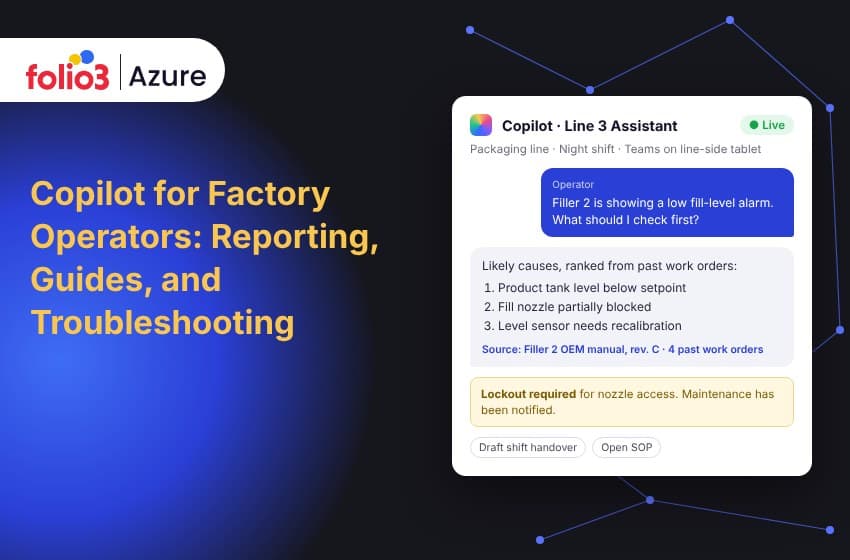
In troubleshooting, Copilot connects an alarm or a symptom to what fixed it before. It searches OEM manuals, past work orders in your CMMS and shift logs, then ranks the likely causes and names the next check to run. It hands off to maintenance whenever the fix needs a lockout or a qualified technician.
The value shows up most on nights and weekends, when the person who has seen this fault twenty times is off shift. Large manufacturers are already running this pattern in production:
- Husqvarna built an AI Factory Companion with Microsoft where operators describe a machine's symptoms and get suggested diagnostic tests and fixes. It can also start analyzing an alarm before anyone asks for help.
- Rockwell Automation runs an assistant at its Singapore plant that draws on fixes documented by engineers with 20 to 30 years on the shop floor, so that experience stays with the plant after those engineers retire.
- BMW Group's Factory Genius searches equipment manuals, quality data and internal fault reports, refreshed daily with shift-log data, rather than the open internet.
The common thread is grounding. Each of these assistants answers from the plant's own records, which is what makes the suggestions worth trusting on a live line.
The Azure stack behind a factory copilot
A factory copilot on Microsoft's platform is a handful of Azure and Microsoft 365 services working together, each doing one job.
| Job on the floor | What it handles | Microsoft component |
|---|---|---|
| The conversation | Takes the operator's question, calls the right tools, returns the answer | Microsoft Copilot Studio |
| Finding the right passage | Indexes SOPs, manuals and work orders so the answer comes from the right page | Azure AI Search |
| Writing the answer | Turns the retrieved passages into plain steps with citations | Azure OpenAI |
| Live machine context | Streams alarms and sensor readings from the line | Azure IoT Hub |
| Production and downtime history | Holds OEE, scrap and downtime data for reports | Microsoft Fabric and Power BI |
| Access and labels | Controls who sees which documents | Microsoft Entra ID and Microsoft Purview |
| Where operators use it | Tablet, phone or line-side kiosk | Microsoft Teams |
Most plants already own some of these pieces from earlier Azure for manufacturing projects, such as IoT Hub connections for remote machine monitoring. The copilot sits on top of that investment rather than replacing it.
Where Copilot should stop: guardrails on the shop floor
A factory copilot should answer only from approved plant documents, cite its source every time, and escalate any question that touches safety-critical work like lockout/tagout. Reports and work orders it drafts stay drafts until a named person approves them.
- Grounded answers only. When no approved document covers the question, Copilot says so and points the operator to a lead. A wrong answer on a running line costs far more than "I don't know."
- Current revisions only. Index the controlled version of each SOP and retire the old ones, so Copilot never quotes last year's torque spec.
- Access by role. An operator, a maintenance tech and a quality engineer see different documents, and Copilot respects the same permissions your file system already uses.
- Human sign-off. Handovers, CAPA drafts and work orders go to a person for approval before they're filed.
- Every exchange logged. Questions Copilot couldn't answer show you exactly where your SOP library has gaps.
These rules start with the data. Deciding which documents Copilot can read, who owns them and how they're labeled is the core of data governance for AI, and it's far easier to settle before rollout than after.
Floor realities to plan for
Office copilots assume a keyboard, a quiet room and a steady connection. The plant floor offers none of those, so a few practical details decide whether operators actually use it.
- Gloves and noise. Voice input on the Teams mobile app works better than typing for most operators, and short answers read better on a small screen than long ones.
- Shared devices. Line-side tablets get passed between people across shifts, so sign-in needs to be fast and tied to each operator's role.
- Language. Copilot can answer in the operator's language even when the OEM manual is only in English or German.
- Coverage. Check Wi-Fi at each station before the pilot. A copilot that times out at the filler won't get a second chance.
How to roll out a factory copilot in five steps
- Pick two or three use cases. Start with the questions operators and leads ask most often, usually the handover report and the top ten repeat faults. Folio3's Copilot agent library includes manufacturing scenarios like equipment maintenance scheduling and quality control monitoring to help shortlist them.
- Get documents and data ready. Audit which SOPs are current, how complete your CMMS work order history is, and where line data lives. A readiness assessment at this stage saves rework later.
- Build and connect the agent. Build the Copilot Studio agent, connect it to your SharePoint SOP library, CMMS and line data, and set role-based access. Copilot Studio is part of Microsoft Power Platform, so Folio3's Power Platform services team handles the build and the integrations.
- Pilot on one line and one shift. Track time spent on handovers, time to find an instruction, and repair time on repeat faults against a baseline from before the pilot.
- Govern, license and scale. Settle governance, right-size Copilot licensing, and add lines once the pilot numbers hold up.
How Folio3 helps manufacturers put Copilot on the floor
Folio3 is a Microsoft Solutions Partner and Direct (Tier 1) Cloud Solution Provider, so one team can cover the plan, the build and the licenses. For a factory copilot, that means Copilot strategy and use case identification, a readiness assessment of your documents and data, a custom Copilot Studio agent connected to your plant systems, licensing through CSP, governance and compliance setup, and ongoing support after go-live.
If your operators spend more time searching than running the line, start with one line and two use cases. Talk to the team about Microsoft Copilot consulting and scope a pilot around the reports and faults that cost your plant the most time today.
Frequently asked questions
What is an industrial AI copilot?
An industrial AI copilot is an AI assistant for plant teams that answers questions from the company's own manuals, SOPs, work orders and machine data. It explains alarms, drafts reports and returns work instructions in plain language, and it cites the source document so operators can verify the answer.
Can Microsoft Copilot write shift reports?
Yes. An operator gives Copilot a few notes about the shift, and it drafts a structured handover report. Connected to line data through a Copilot Studio agent, it can also fill in downtime minutes and open issues automatically. A supervisor should review the report before it's filed.
Is Copilot safe to use on the shop floor?
It's safe when it's set up to answer only from approved, current documents and to escalate safety-critical questions. Plants should block guidance on lockout/tagout and similar procedures beyond pointing to the official document, require human sign-off on drafts, and log every exchange for review.
What data does a factory copilot need?
At minimum, a factory copilot needs your current SOPs and work instructions, OEM equipment manuals, and maintenance work order history from your CMMS. Shift logs, downtime records and live alarm data from systems like Azure IoT Hub make its reports and troubleshooting suggestions more specific.
Should we use Microsoft 365 Copilot or Copilot Studio?
Microsoft 365 Copilot works inside Word, Outlook and Teams, which suits office-style tasks like turning notes into a shift report. Copilot Studio builds custom agents connected to your SOPs, CMMS and line data, which troubleshooting and work-instruction lookups need. Many plants end up using both.
Does a factory copilot work in other languages?
Yes. A copilot can answer an operator in their own language even when the source manual is written in another one. BMW Group added translation to its Factory Genius maintenance assistant for this reason, after finding many manuals weren't available in Hungarian at its Debrecen plant.