It is 6:45 on a Tuesday morning. Marcus, a press brake operator, clocks in and wants to know three things before he touches a machine: what changed since yesterday, whether his paperwork is current, and who to call if something goes wrong. In most plants, those answers live in binders, spreadsheets and the memory of a busy supervisor.
AI can change that. Used well, it gives every worker a simple assistant that answers procedure questions, delivers short training at the right moment and helps write up incidents quickly, while people keep every safety decision. Here is what that looks like across one shift. Marcus is a composite example, not a real customer.
The short answer: AI streamlines compliance, training and incident handling by acting as one connected helper. It answers procedure questions from approved documents, delivers a short lesson when something changes, and turns a quick voice note about a near miss into a report a supervisor can review. People still approve every report and every safety-critical step.
A day in the life of a factory worker with AI
6:45 AM: Starting the shift with a simple checklist
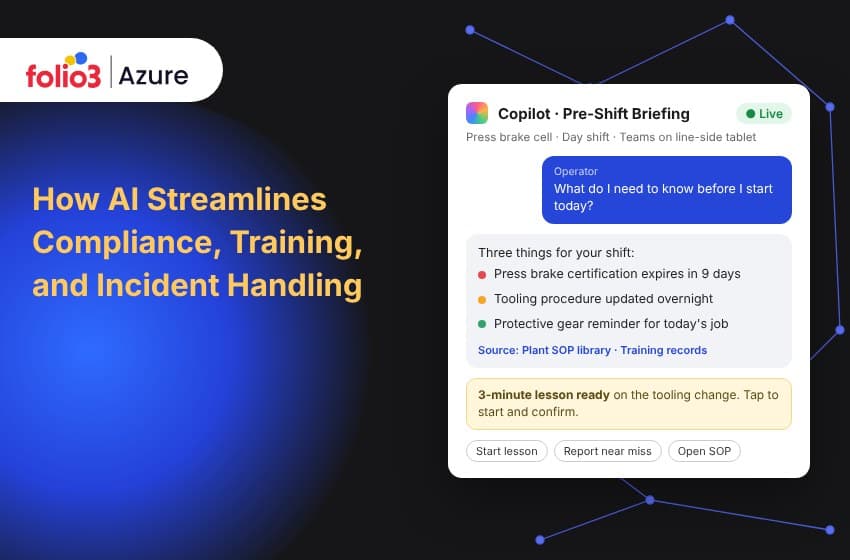
Marcus opens Microsoft Teams on a tablet by his machine and asks what he needs to know today. The assistant, a Microsoft Copilot Studio agent built on his plant's own procedures and training records, gives him three things: a certification that expires in nine days, a tooling procedure that was updated overnight, and a reminder about protective gear for today's job.
No binders and no hunting. It only shows him what his role allows, and it answers from approved documents.
7:30 AM: Training in three minutes
Because the procedure changed, Marcus gets a three-minute lesson: what is different, two quick questions and a tap to confirm. AI can draft lessons like this from the procedure itself and translate them for crews who speak different languages. A trainer should still check them before release, as Adobe’s eLearning team advises. When Marcus finishes, the plant has a dated record without anyone typing it into a spreadsheet.
9:40 AM: A question about locking out a machine
A jam stops the machine. Marcus asks how to clear it, and the assistant gives the steps from the approved procedure. But when the fix involves cutting the machine's power (lockout/tagout), it points him to the official procedure and tells him to call his lead instead of improvising. That is deliberate. As the law firm Ogletree puts it, AI is a safety ally, not a safety manager.
11:15 AM: A near miss, written up in minutes
A metal sheet slips and nobody is hurt. Instead of filling in a paper form later, Marcus describes it out loud. The assistant asks the missing questions, checks whether something similar has happened before and sends a draft to his supervisor. Tools like this already exist: DataRoot Labs built one that sorts incidents and drafts descriptions while the safety team reviews them, and Microsoft describes a similar approach for factory safety officers.
If it had been serious, the clock would matter. OSHA requires employers to report a work-related death within 8 hours, and an inpatient hospitalization, amputation or loss of an eye within 24 hours. The assistant can flag the deadline, but a person makes the call.
1:30 PM: The lesson that follows the incident
Once the supervisor confirms the near miss, the assistant suggests a four-minute refresher on that exact hazard for Marcus's crew. Some safety software already works this way: Vector Solutions recommends corrective training the moment an incident is logged.
3:30 PM: Ready for an audit without the scramble
By mid-afternoon, the safety manager can see who has finished training, which fixes are still open and which incidents are trending, all in one place. Because everything was recorded as it happened, there is no rush before an audit. Folio3 builds this kind of view with manufacturing data analytics dashboards, and a single reliable data foundation, like the one in our guide to production data reporting on Microsoft Fabric, keeps the numbers consistent across teams.
Official recordkeeping still applies. Many employers with more than 10 employees keep OSHA Forms 300, 300A and 301, as OSHA’s recordkeeping page explains. AI can prepare the drafts, and your safety lead signs them.
5:30 PM: Handing over to the next shift
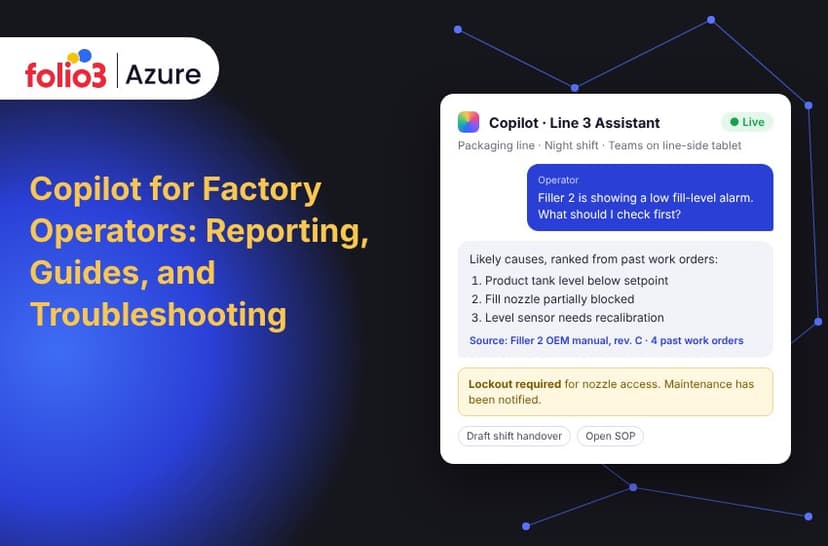
Marcus dictates a quick handover and the assistant drafts it for his supervisor. Handovers, work instructions and machine troubleshooting are covered in our companion post on Copilot for factory operators.
Why this matters: the people on the floor get the least training
The workers closest to the machines often get the least help with new technology. A 2023 BCG study found that 14% of frontline workers had received AI training, compared with 44% of leaders, as reported by Manufacturing Dive. The Manufacturing Institute found that only 19% of manufacturers offer any AI-related training. And in Deloitte's 2025 survey, only 48% of manufacturers had a training and adoption standard, according to Food Industry Executive.
Training that arrives at the moment it matters, like Marcus's three-minute lesson, helps close that gap.
Keeping people in charge
A good assistant on the factory floor follows a few simple rules:
- It answers only from approved, current documents, and says so when it does not know.
- It points to the official procedure for anything safety-critical and asks the worker to call a lead.
- Every report, lesson and record is a draft until a named person approves it.
- Each person sees only the documents their role allows.
- Every question is logged, so unanswered ones show where your procedures have gaps.
Deciding which documents the assistant can read, and who owns them, is the heart of AI data governance. It is much easier to settle before rollout than after an incident.
How it works behind the scenes
Behind the simple chat is a small set of Microsoft tools working together. Copilot Studio runs the assistant. Azure AI Search finds the right page in your documents so answers come from your own content. Azure OpenAI writes the clear, cited answer. Teams is where workers use it, and Power BI gives managers their view.
If your plant already uses Azure for machine monitoring, the assistant can build on that. Folio3's Azure for manufacturing work covers IoT, analytics, AI and machine learning.
Where to start
- Pick three starter tasks. A morning briefing, short lessons after procedure changes and near-miss reporting are good first choices. Folio3's Copilot Agent Library has manufacturing examples, such as quality control monitoring and equipment maintenance scheduling, to help shape the idea. The compliance, training and incident assistant itself is built as a custom Copilot solution.
- Tidy your documents. Check which procedures are current, where training records live and how incidents are sorted today.
- Build it and test it on one line. Our Power Platform services team builds Copilot Studio assistants and connects them to your systems. Measure how long a near-miss report takes, how many days a new procedure takes to reach everyone, and how often the same near miss repeats.
Once the numbers look good on one line, add the next.
How Folio3 can help
Folio3 is a Microsoft Solutions Partner and Microsoft CSP partner with more than 15 years of experience on Azure. For a compliance, training and incident assistant, we can:
- Plan the roadmap and assess how ready your documents, data and security are
- Work with your operations, safety and training leaders to choose the first use cases
- Build and connect a custom Copilot solution, and train your team to run it
- Handle Copilot licensing, governance and ongoing support
If your workers lose time searching binders and your safety team spends audits gathering evidence, start small. Talk to the team about Microsoft Copilot consulting and scope a pilot around the tasks that cost your plant the most time today.
Frequently asked questions
How does AI help with compliance in manufacturing?
AI answers procedure questions from approved documents, records training as it happens and helps draft incident reports. That leaves a dated trail ready for audits, while people keep responsibility for decisions and sign-off.
Can AI write an OSHA incident report?
AI can draft the report from a worker's description, but a qualified person must review and approve it. OSHA requires reporting a work-related death within 8 hours, and an inpatient hospitalization, amputation or loss of an eye within 24 hours.
Is it safe to use AI for lockout/tagout?
AI can help people find the approved lockout/tagout procedure, but it should not replace it. The training, communication and inspections around energy control still need to be done by people.
Does AI replace safety managers?
No. AI handles drafting, lookup and reminders. Safety managers still judge risk, own corrective actions and sign regulatory records.
What Microsoft tools are used?
A typical build combines Microsoft Copilot Studio, Azure AI Search, Azure OpenAI, Teams and Power BI, with Azure IoT Hub when live machine signals are needed.
Sources
- OSHA: Recordkeeping requirements
- Microsoft Learn: Copilot Studio overview
- Microsoft Learn: Retrieval-augmented generation in Azure AI Search
- Microsoft Adoption: Improve factory safety
- Manufacturing Dive: Manufacturers are reskilling factory workers
- Manufacturing Institute: AI skills training
- Food Industry Executive: Frontline AI training in manufacturing
- Ogletree: Implementing AI as a safety program ally in manufacturing settings
- Adobe eLearning: The role of AI in modern technical training programs
- DataRoot Labs: AI Safety Incident Classifier
- Vector Solutions: AI Safety Training Recommendations