Most business data arrives in batches. A report runs at the end of the day. A pipeline syncs overnight. A dashboard refreshes every hour. For many workflows, that is fine. But there is a growing class of decisions — fraud detection, supply chain disruption alerts, infrastructure monitoring, customer behavior triggers — where batch latency is not a limitation that can be worked around. It is a structural problem.
Real-time data intelligence in Microsoft Fabric is built specifically to address that problem. Through a purpose-built suite of streaming tools — Eventstream, KQL Database, and Data Activator — Fabric enables organizations to ingest, process, analyze, and act on data as it arrives, at scale, without the infrastructure complexity that real-time architectures traditionally require.
This blog covers how that architecture works, what each component contributes, how it connects to Fabric’s broader data platform, and where the most impactful real-world use cases are emerging.
Why Real-Time Data Stream Management Matters Now?
The gap between when something happens and when a business knows about it has always had a cost. In most organizations, that gap is measured in hours. Data is extracted, loaded, and transformed in scheduled cycles, and by the time a pattern appears in a dashboard, the moment to act on it has often passed.
The shift toward real-time data intelligence is not about novelty — it is about closing that gap for the workflows where it matters most. A fraudulent transaction flagged two seconds after it occurs is recoverable. One flagged eighteen hours later, after the batch pipeline runs, is not. An IoT sensor reading that triggers a maintenance alert before a machine fails prevents downtime. The same reading buried in a daily report review is a post-mortem.
Efficient data handling in real time also changes how organizations think about data architecture. Rather than designing for what happened and building reports around it, real-time systems design for what is happening — with data stream architecture that can route, transform, and act on events as they flow through the system.
The Real-Time Intelligence Suite in Microsoft Fabric
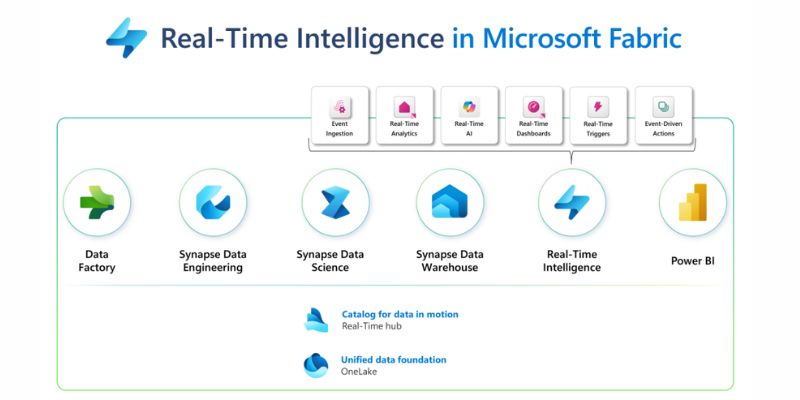
Microsoft Fabric’s approach to real-time data streams is organized around three core components that work together as a unified pipeline: Eventstream for ingestion and routing, KQL Database for storage and fast querying, and Data Activator for automated action. Understanding what each does — and how they connect — is essential to understanding Microsoft Fabric’s architecture as a whole.
Eventstream: Ingestion and Routing Without Code
Eventstream is Fabric’s no-code solution for capturing, transforming, and routing streaming data. It provides connectors to a wide range of real-time data sources — Azure Event Hubs, Azure IoT Hub, Apache Kafka endpoints, Change Data Capture (CDC) feeds from transactional databases, and custom application event streams — so that data arriving from any of these sources flows directly into Fabric without requiring custom pipeline code.
Beyond ingestion, Eventstream supports in-transit transformations. Before data reaches its destination, it can be filtered, aggregated, enriched, or split across multiple destinations — a live IoT feed can be simultaneously routed to a KQL Database for real-time analysis and to a Fabric Lakehouse for long-term storage, in a single Eventstream configuration. This is a significant departure from traditional streaming architectures, where routing and transformation logic is typically coded and maintained separately from the ingestion layer.
For data engineers, this removes the most time-consuming part of building streaming pipelines: the custom infrastructure work that precedes any actual analysis. Eventstream handles the connectors, the routing, and the basic transformation layer so that engineering attention can focus on the logic, not the plumbing.
KQL Database: Fast Querying on Streaming Data
Once data is flowing through Eventstream, it needs somewhere to land that is optimized for the kind of queries that make real-time analysis useful — fast, time-series-oriented, aggregation-heavy queries across large volumes of recent data.
KQL (Kusto Query Language) Database is that destination. It is a columnar, append-optimized data store built for time-series and streaming data, capable of ingesting millions of events per second while maintaining sub-second query response times. KQL Database supports live data monitoring at a scale and speed that relational databases are not designed for: querying the last 60 seconds of sensor readings across 10,000 devices, calculating rolling averages over a sliding time window, or detecting a pattern in transaction data as it arrives — these are natural KQL workloads.
KQL itself is purpose-built for these queries. A query like “show me all cost centers where spend exceeded budget by more than 10% in the last hour” takes a few lines of KQL and runs in milliseconds against a live stream. This is the query language that powers Microsoft Fabric’s data analytics capabilities at the real-time tier — fast enough to drive dashboards, alerts, and automated responses without approximation or sampling.
Data Activator: Automated Action on Live Data
Eventstream ingests. KQL Database stores and queries. Data Activator closes the loop by turning live data conditions into automated actions — without requiring code.
Data Activator monitors data flowing through Fabric in real time and triggers configured responses when defined conditions are met. When a sensor reading exceeds a threshold, it can send an alert to a Teams channel, trigger a Power Automate workflow, or fire an API call to an external system. When a transaction pattern matches a fraud signature, it can flag the record, notify a risk team, and initiate a review workflow — automatically, in the moment.
This is where real-time data stream management becomes real-time operational intelligence. The data is not just visible in a dashboard — it drives action. Organizations are no longer monitoring their business; they are running workflows that respond to it continuously.
Data Ingestion Techniques in Microsoft Fabric
Real-time data intelligence in Microsoft Fabric sits within a broader set of data ingestion techniques that cover the full spectrum from batch to streaming. Understanding how these approaches work together is important for designing an architecture that handles both real-time streams and the historical data context that makes those streams meaningful.
- Streaming ingestion via Eventstream handles the real-time tier — continuous, low-latency data flows from event sources, IoT devices, CDC feeds, and application streams. This is the right pattern for data that needs to be acted on immediately.
- Pipeline-based batch ingestion via Data Factory handles scheduled, high-volume data movement from source systems — ERP, CRM, databases, files, and external APIs — into OneLake on a trigger or schedule basis. Data Factory in Microsoft Fabric is the right pattern for data that needs to be transformed, reconciled, and loaded at a defined cadence rather than in real time.
- On-premises ingestion via the On-Premises Data Gateway enables organizations with data in legacy systems, local databases, or restricted environments to bring that data into Fabric securely. Connecting on-premise data sources to Microsoft Fabric is often the first integration step for enterprises modernizing their data architecture without abandoning existing systems.
- Hybrid and multi-cloud ingestion — for organizations running workloads on AWS or Google Cloud alongside Azure — Fabric’s external cloud connectors allow streaming and batch data to flow from those environments into OneLake without complex custom integration work. Connecting to external cloud data sources with Microsoft Fabric covers the configuration patterns for these hybrid architectures.
The key principle across all of these is that data lands in OneLake — Fabric’s unified storage layer — regardless of its source or ingestion method. This means that real-time streaming data from Eventstream and historical batch data from Data Factory pipelines are available from the same location, queryable together, and subject to the same governance controls.
Data Stream Architecture: How the Layers Connect
A well-designed data stream architecture in Microsoft Fabric follows a layered pattern that separates ingestion, processing, storage, and consumption while keeping all layers within the same governed environment.
- Ingestion layer — Eventstream captures real-time events from connected sources. Data Factory pipelines bring in batch and scheduled data. Both land in OneLake.
- Processing layer — In-transit transformations in Eventstream handle real-time filtering and routing. Spark notebooks and dataflows in the Data Engineering workload handle more complex transformations on data already in OneLake. The Medallion Architecture pattern — Bronze for raw data, Silver for cleaned and transformed data, Gold for analytics-ready aggregations — is the recommended approach for structuring this layer.
- Storage layer — KQL Database stores streaming data for fast real-time queries. Fabric Lakehouse stores structured and semi-structured data for historical analysis. Microsoft Fabric Data Warehouse handles structured enterprise data for SQL-based analytics and reporting workloads.
- Consumption layer — Power BI connects directly to all of these storage layers for visualization and reporting. Data Activator monitors live data conditions and triggers automated responses. Integrating Power BI with Microsoft Fabric ensures that real-time data flowing through Eventstream and KQL Database reaches decision-makers in live dashboards alongside historical context from the data warehouse.
The critical advantage of this architecture — relative to building equivalent functionality on separate tools — is that all layers share the same security model, the same OneLake storage foundation, and the same governance controls. There is no data movement overhead between tiers, and access policies configured at the OneLake level apply uniformly across every workload.
Microsoft Fabric Features for Live Data Monitoring
Live data monitoring is one of the most immediate productivity gains that Microsoft Fabric’s real-time intelligence suite delivers. Several Azure Fabric features work together to make this possible at enterprise scale:
- Real-Time dashboards in Power BI automatically refresh as new data arrives in KQL Database, giving operations, finance, and supply chain teams a live view of business performance without manual report refreshes or scheduled batch runs.
- KQL querysets allow analysts to run ad hoc queries against live data streams directly in the Fabric interface — no separate data science environment, no exported dataset, no lag between the question and the answer.
- Data Activator monitors watch defined KPIs and data conditions continuously. When a metric crosses a threshold — inventory below safety stock, server latency above SLA, revenue rate deviating from forecast — alerts fire immediately to the right people or systems.
- Capacity Metrics App provides visibility into resource consumption across Fabric workloads, including streaming pipelines, so that engineering teams can identify bottlenecks and optimize cost allocation as data volumes grow.
Scalable Data Solutions: How Fabric Handles Growth
Scalable data solutions require architecture that handles growth in data volume, source variety, and query complexity without requiring manual infrastructure intervention. Microsoft Fabric’s cloud-native, SaaS architecture provides this by design.
Eventstream scales automatically with event volume — there is no capacity pre-provisioning required to handle a spike in IoT telemetry or a surge in transaction events. KQL Database maintains sub-second query performance across billions of records through its columnar storage and time-series optimization. OneLake scales storage horizontally without storage tiers or manual partitioning.
For organizations that are currently building real-time streaming on self-managed infrastructure — Apache Kafka clusters, custom Spark streaming jobs, manual pipeline orchestration — migrating to Fabric’s managed real-time intelligence suite typically reduces both operational overhead and end-to-end latency. The tradeoff of infrastructure flexibility for managed scalability is, for most enterprise workloads, clearly worthwhile. Microsoft Fabric services at the enterprise level support this migration, including architecture review, pipeline migration, and governance configuration, so that organizations can move to Fabric’s real-time capabilities without rebuilding their data models from scratch.
Real-World Use Cases for Real-Time Data Intelligence
The combination of Eventstream, KQL Database, and Data Activator enables a set of use cases that batch architectures cannot support:
- Fraud detection in financial services. Transaction streams flow into Eventstream, KQL queries run anomaly detection logic against recent transaction history in real time, and Data Activator fires an alert or blocks a transaction the moment a suspicious pattern is detected. The entire loop — from transaction event to action — runs in seconds.
- IoT telemetry and predictive maintenance in manufacturing. Sensor data from production equipment is ingested continuously via Eventstream. KQL Database analyzes vibration, temperature, and pressure readings against defined thresholds. When readings deviate from expected ranges in ways that predict equipment failure, Data Activator triggers a maintenance workflow before the failure occurs — eliminating unplanned downtime.
- Supply chain and logistics monitoring. Location data, order status events, and inventory updates from logistics partners flow into Eventstream in real time. Operations teams monitor delivery status, inventory levels, and exception conditions on live Power BI dashboards, with automatic alerts when shipments deviate from expected timelines.
- Customer behavior triggers in retail and ecommerce. Clickstream and purchase event data flows through Eventstream, with KQL queries identifying real-time behavioral signals — cart abandonment, high-value browse sessions, churn risk patterns — that trigger personalized responses via Data Activator and connected marketing automation tools.
Conclusion
Real-time data intelligence in Microsoft Fabric is not a feature — it is a complete streaming data architecture that covers ingestion, processing, storage, querying, monitoring, and action within a single, governed platform. Eventstream removes the infrastructure barrier to streaming ingestion. KQL Database provides the query speed that makes live data monitoring useful rather than decorative. Data Activator closes the loop between insight and response.
Folio3 Azure specializes in Microsoft Fabric implementation, from data stream architecture design and Eventstream configuration to KQL modeling, Power BI integration, and Data Activator workflow setup. As a certified Microsoft Solutions Partner, we help organizations move from batch reporting to real-time data intelligence at enterprise scale. Explore our Microsoft Fabric services and end-to-end BI solutions, or contact our team to discuss your real-time data architecture.